
Your TikTok region affects whose videos you see in your recommendations, who sees yours, and which features are available to your account. You may need to change it after moving, when managing a brand account for another market, or when checking how content looks to an audience in another country.
There is no separate “change region” button in TikTok. Below, we explain how the app determines your country and which methods of changing it actually work.
How TikTok determines your region
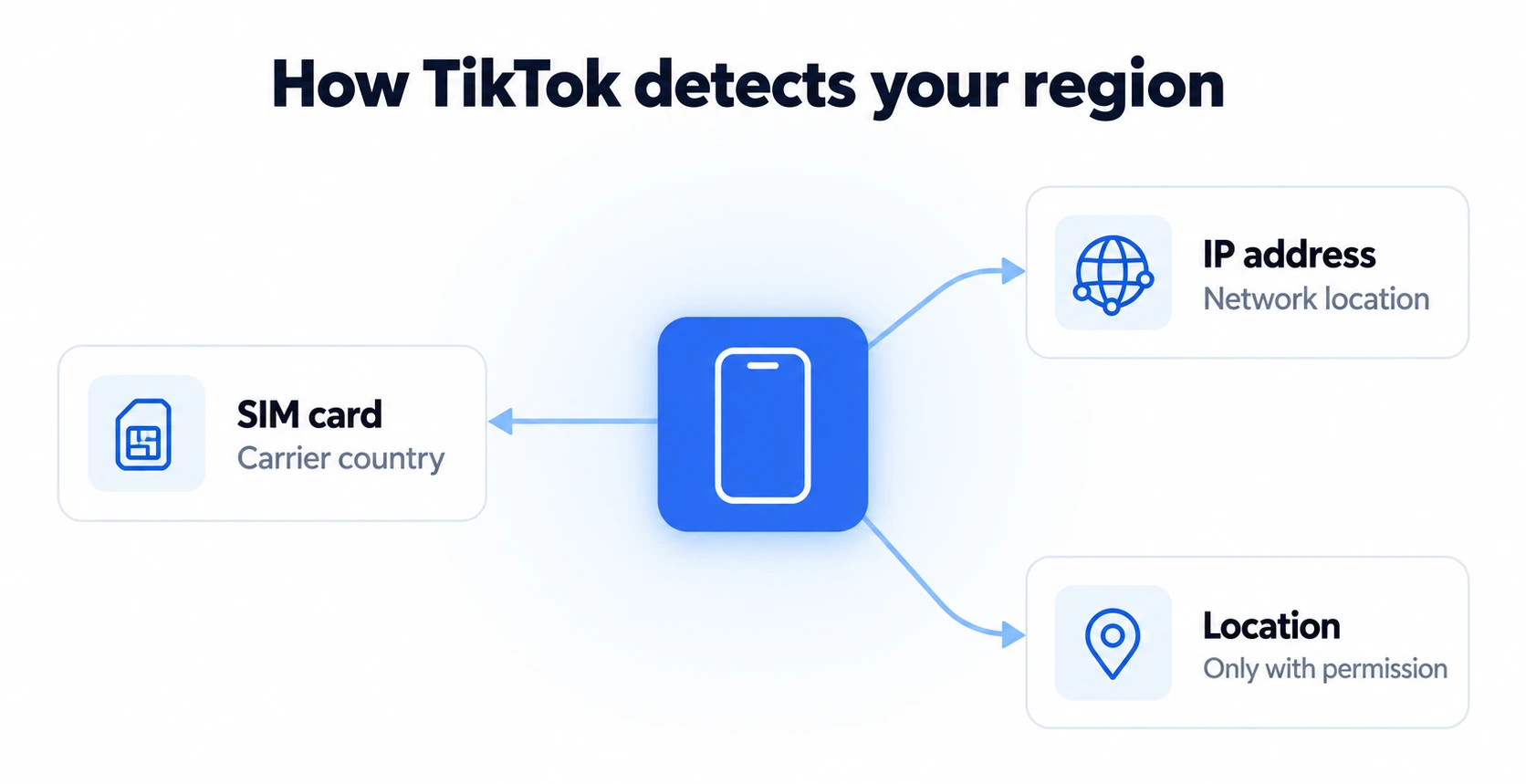
TikTok looks at several signals at once:
- SIM card. The SIM’s country code indicates where your mobile service is registered. This is one of TikTok’s main signals.
- IP address. It provides an approximate location and influences recommendations, the Nearby feed and the shop.
- Location. TikTok obtains your precise location through GPS, Wi-Fi and cell towers only with your permission. In the US, the app currently collects only approximate location: the new US TikTok policy allows precise location collection, but the feature has not launched yet.
If location permission is off, TikTok determines your country from your SIM and IP address. The main things to consider are therefore the SIM card and the network your phone uses to access the internet.
Can you change your region in settings?
Partly. In-app settings change individual features, but not the country associated with your account:
| Platform | What you can change in the app | What stays the same |
|---|---|---|
| TikTok | Region of the Nearby feed | Account country, which TikTok determines from your SIM and IP |
| Location attached to an individual post | Recommendations based on your network and activity | |
| Facebook Marketplace | Listing search location and radius | Profile country |
| YouTube | Content location | Google Account country |
Why a VPN does not change your TikTok region
A VPN changes only your IP address. The SIM card in your phone stays the same, along with its carrier country. The app receives conflicting signals: an IP address from one country and a SIM from another.
In practice, this means your feed often remains focused on your home country, and you may encounter extra checks when signing in. For more on the difference between an IP address and a physical location, see how to change your phone’s IP address and location.
Ways to change your region: a comparison
| Method | What it changes | Limitations | When it fits |
|---|---|---|---|
| In-app settings | Individual features: Nearby feed, content location | Does not change the account country | Quickly viewing content from another region |
| VPN | IP address only | Your SIM stays the same, creating conflicting signals | Brief website browsing |
| Local SIM or eSIM | Carrier country | The phone stays with you; its IP may point elsewhere | You are already in the country or have a local eSIM |
| Real phone in the country (DroidDesk) | SIM, network and device together | Paid; no calls; SMS only on your own eSIM | Managing an account for another market without traveling |
How to change your TikTok region using a real phone in the required country
The most reliable setup is one where all signals match: a local SIM, a local network and a device in that country. You can do this without traveling by renting a phone on DroidDesk:
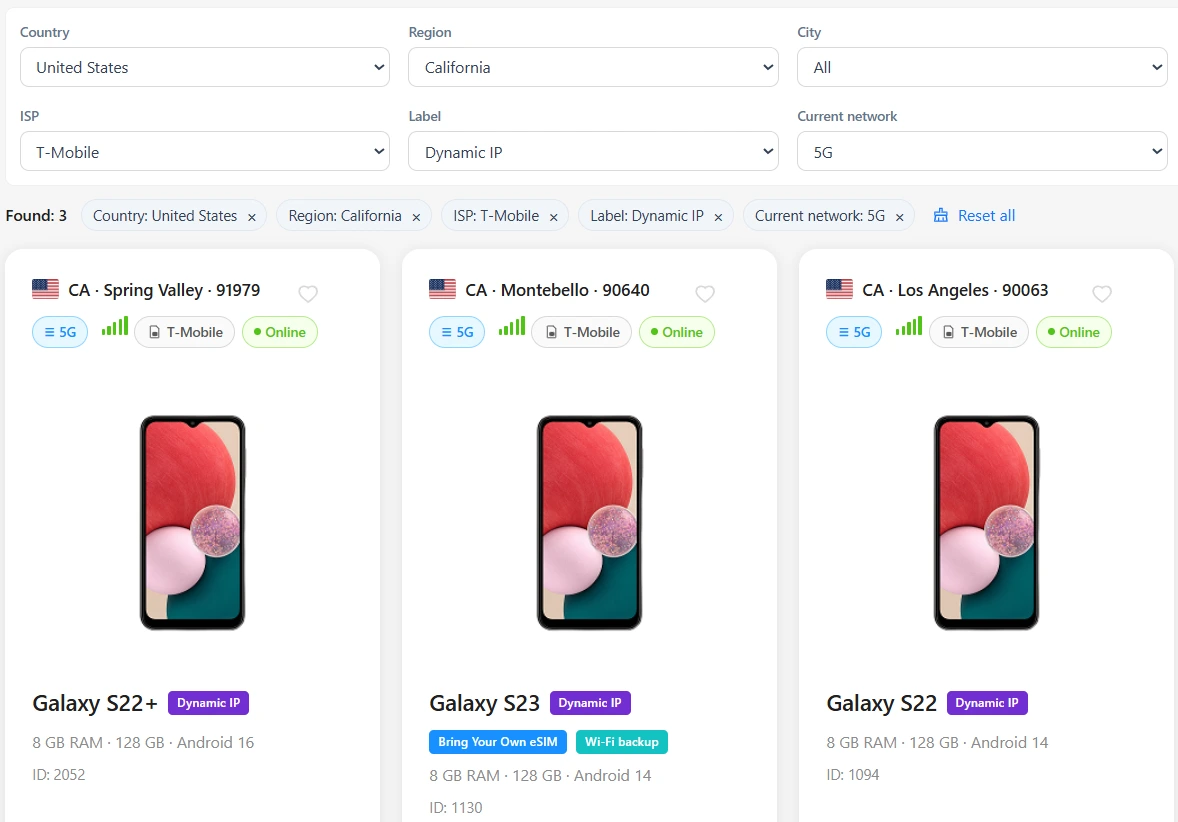
- Open the catalog and choose a country. Phone catalog
- Choose a phone with the Dynamic IP (5G/LTE) connection type: it uses a local carrier’s SIM. Wi-Fi phones access the internet through a home network and do not provide a SIM signal.
- Choose a plan of at least 1 day: it includes Google Play so you can install TikTok.
- Install TikTok and create an account for that market. An existing account long associated with another country may not switch, so a separate account is more reliable for a new market.
- Publish and browse content: the feed and reach will develop around the local audience.
For an explanation of cloud phones and how they work, see what is a cloud phone.
Instagram, Facebook and YouTube
- Instagram. There is no separate country setting. You can add a location to an individual post, but recommendations are based on your network, language and account activity.
- Facebook Marketplace. You can change the location and search radius directly in Marketplace: this affects only the listings you see.
- YouTube. You can choose your content location in settings (Settings → General → Location). This changes recommendations and trending content, but not your Google Account country.
The same rule applies to all three as to TikTok: a device connected to a local network provides the most complete local environment.
What to know before you start
- Follow the platform’s rules and the laws of the country you are creating the account for.
- A carrier IP does not always identify the exact city, only the country or region.
- DroidDesk does not support calls, and SMS messages are available only on your own eSIM. How to activate an eSIM from abroad
- Data on the phone is deleted when the rental ends, so save your account login details beforehand.
Need a phone in the US, UK or another country? Rent a real Android with a local SIM from $5 per hour
Choose a countryFrequently asked questions
Can I change my TikTok region without a VPN?
Yes. A VPN is one of the least helpful options because it changes only your IP address. Changing your region is more reliable when the SIM and network belong to the required country, using a local SIM or a real phone in that country.
Does the SIM card affect your TikTok region?
Yes. The SIM card’s country code is one of the main signals TikTok uses to determine your region.
How does TikTok know my location if location services are off?
Through your SIM card and IP address. The app obtains precise location only with your permission.
Why does TikTok show videos from another country after a trip?
The feed adjusts to your network and IP address. After you return home, it usually shifts back to local content gradually.
How do I change my country on Instagram?
There is no such setting. Recommendations depend on your network, language and activity, so working with an audience in another country requires access to a local network.
How much does a phone in another country cost on DroidDesk?
From $5 per hour. Installing TikTok requires a plan starting at $15 per day; the price depends on the model and country.