
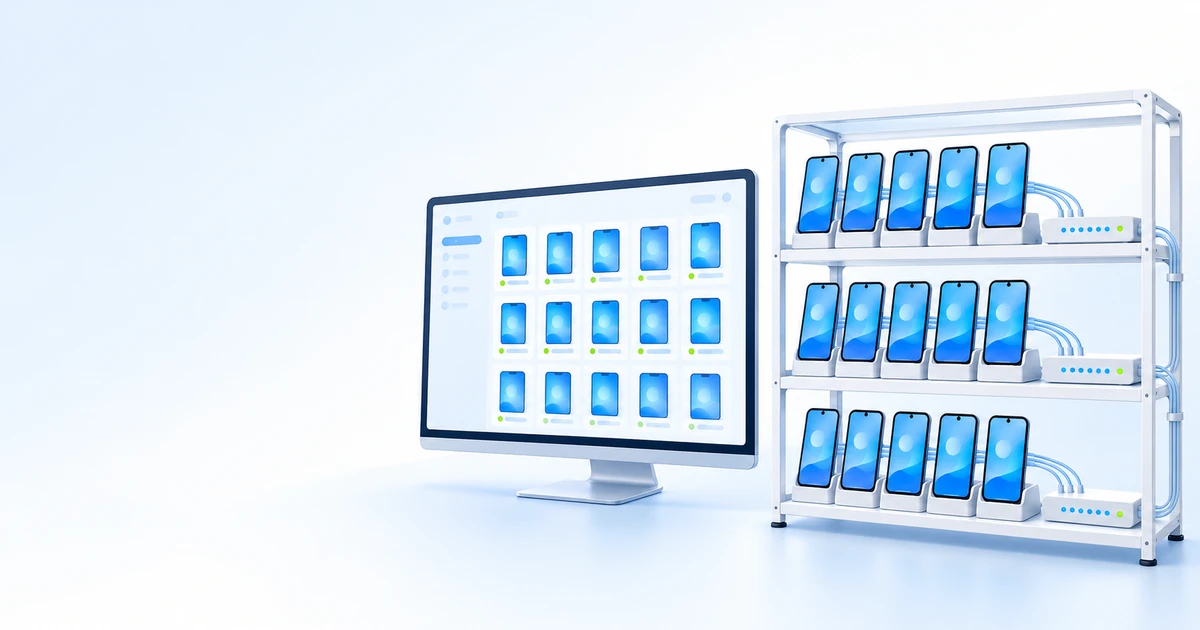
A phone farm is a collection of real phones controlled centrally from one computer or dashboard. People build them to test apps on different models, run mobile games around the clock, check ads in different regions and manage client accounts at agencies.
This step-by-step guide covers what to buy, which software to use, how much it costs and when renting ready-to-use phones is easier.
Three phone farm models
Before buying phones, choose a setup. It will determine your budget and how much time you spend on maintenance.
| Model | What it is | Advantages | Disadvantages | Best for |
|---|---|---|---|---|
| DIY rack setup | Phones on a rack, USB hubs and computer control | Lowest startup cost, easy to learn | Lots of manual work, difficult to scale | Experiments, up to 10–20 devices |
| Box phone farm | Phone motherboards in a purpose-built enclosure with power and control | Compact, tidy, higher device density | Vendor lock-in, on-site maintenance | Mid-sized farms with staff on site |
| Cloud farm (rental) | Remote phones you control from a browser | No hardware or maintenance, multiple countries | Monthly fees | Quick starts, projects across multiple countries |
Phone farm hardware
Phones
- Used Android smartphones are suitable for getting started. Estimates in publicly available guides put used phones on eBay at $30–60 and new budget models at around $200.
- Choose identical or similar models: this makes system updates, app installation and device replacement easier.
- Allow for 10–15% spare phones: some devices will fail.
Power and USB hubs
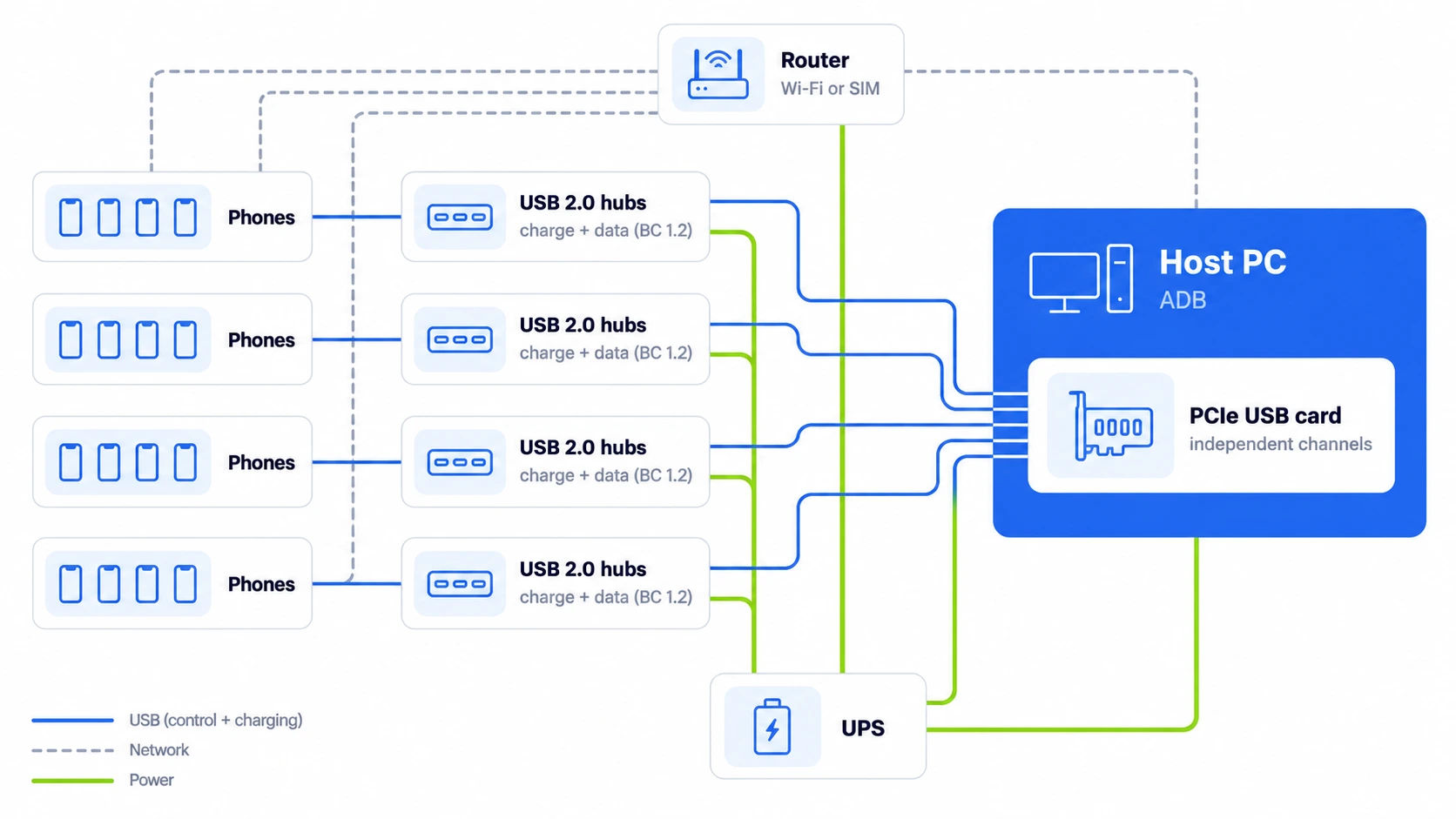
You need externally powered hubs that charge phones and transfer data at the same time (USB BC 1.2, CDP mode). An ordinary multiport charger will not work. Calculate power requirements from the hub’s specifications and check whether it can sustain that output across all ports simultaneously.
The computer’s USB controller is another bottleneck. Having lots of connectors on a motherboard does not mean it can handle dozens of phones: on some platforms, problems begin with just 9–12 devices. Larger farms therefore use a PCIe USB card with independent channels and connect a separate hub to each channel.
For reference, a tested 28-phone setup uses four 7-port USB 2.0 hubs (up to 7.5 W per port, with a 60 W adapter), a PCIe card with four independent channels and a standard Intel Core i5 PC with 8 GB of RAM.
Rack, cooling and network
- Use a rack or shelves with holders so phones are not stacked on top of each other.
- Ventilation: batteries that remain charging in warm conditions can swell. Keep the room temperature at or below 24 °C.
- Use a dedicated router for the farm and a UPS. Connect power as follows: wall outlet → UPS → power strip → computer, hub adapters and router.
- USB provides control and charging, but not internet access. Each phone needs Wi-Fi or a SIM, and the computer is best connected to the router by cable.
Phone farm management software
- ADB (Android Debug Bridge). Google’s official tool for installing apps, rebooting devices and sending commands to each phone from a computer.
- scrcpy. A free tool for mirroring a phone’s screen and controlling it from a computer over USB or Wi-Fi. Each device opens in a separate window.
- Appium. Runs automated app tests on multiple phones in parallel.
- Tasker. Automates actions directly on the phone using schedules, triggers and workflows.
How to build a phone farm: step by step
- Define your task and device count: 8–12 different models are enough for app testing, while around-the-clock gaming calls for identical phones.
- Buy phones with 10–15% spares and reset them to factory settings.
- Prepare the rack, externally powered hubs and UPS.
- Set up the network: a dedicated router or SIM cards if the task requires mobile data.
- Enable Developer options and USB debugging on each phone, connect it to the computer and check the connection with the adb devices command.
- Label the phones, cables and hub ports, and record which ADB serial number belongs to each position. You can then find a faulty device in a minute.
- Install management software: scrcpy for manual work, Appium for automated tests.
- Set up monitoring and maintenance for device connectivity, battery level, temperature, USB disconnections, scheduled restarts and updates.
How much does a phone farm cost?
Estimated prices from publicly available guides for a farm of 10–20 phones:
| Item | Estimated price | Notes |
|---|---|---|
| Phones | $30–60 used, around $200 for a new budget model | Plus 10–15% spares |
| Externally powered USB hub (16–20 ports) | $50–400 | Simultaneous charging and data transfer (BC 1.2) |
| Rack or shelves | $50–300 | Phone holders |
| Host computer | $300–800 | Or an existing PC |
| Router | $100–300 | Dedicated network for the farm |
| UPS | $150–300 | Protection against power outages |
| Cables | $100–200 | Quality USB-C cables |
| SIM card | Around $30 per month per US line | Only if mobile data is needed |
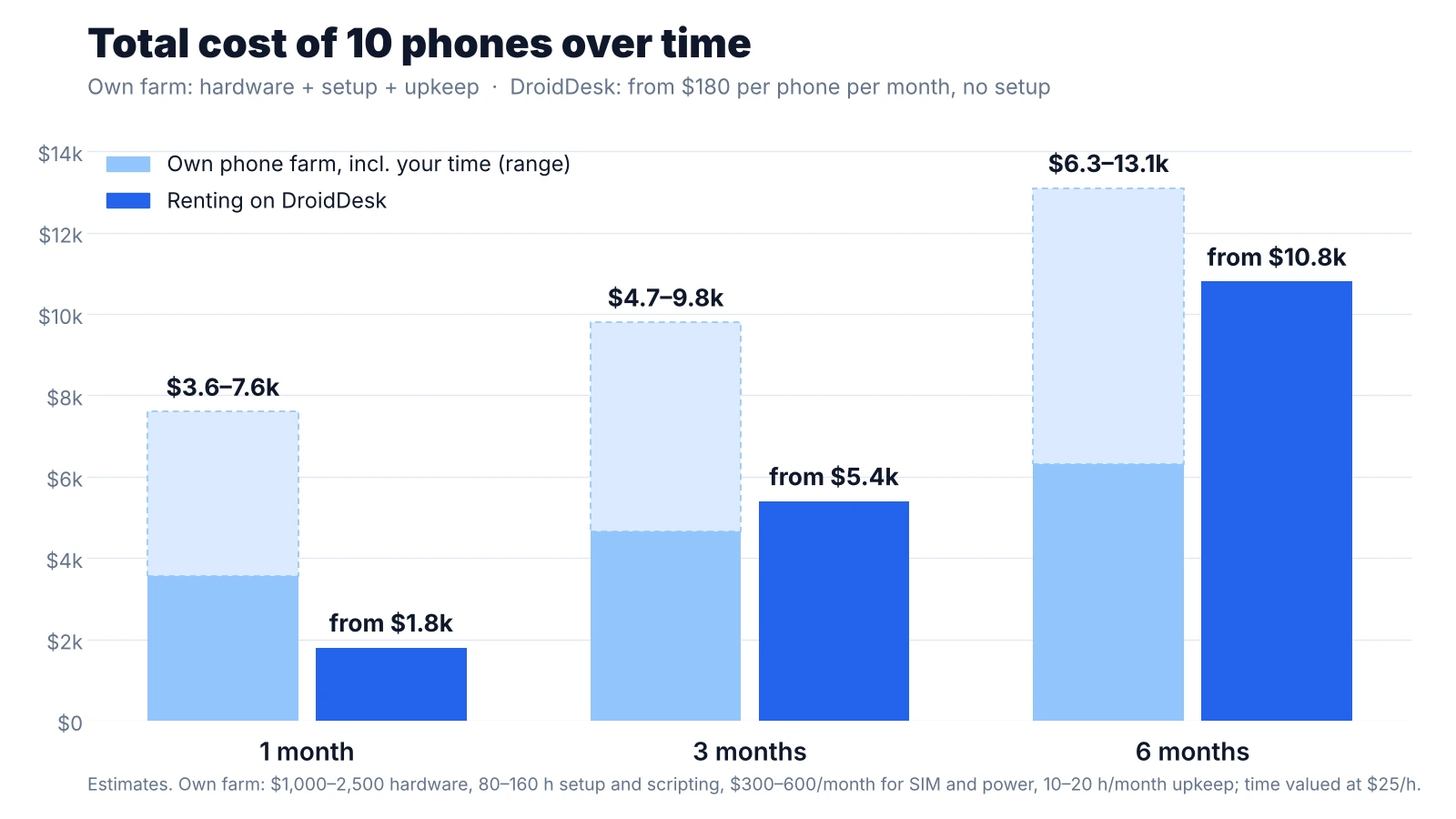
In total, a farm of 10–20 devices costs approximately $1,000–2,500 upfront, plus $300–600 per month for mobile service and electricity. Account for your time separately: purchasing, assembly, software setup and scripting typically take 80–160 hours before the first working deployment, followed by 10–20 hours of maintenance per month.
What changes as the farm grows
| Size | What you need | Main challenge |
|---|---|---|
| 1–10 phones | Shelf, one hub, scrcpy | Manual restarts and configuration |
| 10–50 phones | Rack, several high-powered hubs, UPS, centralized management software | Maintenance becomes a job of its own |
| 50–100+ phones | Dedicated room, industrial power infrastructure, monitoring, staff | Cooling, device replacement, staffing costs |
Build your own or rent?
If you count only the hardware, owning a farm looks cheaper. But before the first working deployment, you need to buy and assemble the equipment, configure the software, write automation scripts and get everything running reliably. Then you need to keep maintaining the phones. Valuing that time at just $25 per hour makes renting cheaper in the first few months and comparable over six months, without months of preparation before launch. Here is a comparison for 10 devices:
| Feature | Your own farm | Renting on DroidDesk |
|---|---|---|
| Upfront cost | $1,000–2,500 for hardware + 80–160 hours of assembly and setup | $0, no hardware |
| Monthly cost | $300–600 plus 10–20 hours of maintenance | From $180 per device per month (from $1,800 for 10) |
| Countries | Wherever the farm is located | Phones with local network connections in different countries |
| Maintenance | Your responsibility: batteries, updates, replacements | Handled by phone owners and the service |
| Time to launch | Several days to weeks | A few minutes |
| Best for | Long projects in one location | Short projects, multiple countries, quick starts |
For more on renting real phones, see what is a cloud phone.
Planning a long-term rental and finding that these figures make it more expensive? Get in touch: we may be able to work something out for special clients 😉 Contact the DroidDesk team
Rules and risks
- A phone farm itself is legal; what matters is how it is used. Artificially inflating likes, views, reviews or ad clicks violates platform rules and, in many countries, the law.
- Overheating and swollen batteries pose a real fire risk: do not put the farm in an enclosed space without ventilation.
- Avoid storing personal data and passwords on farm phones unless necessary.
Already have spare phones?
Instead of adding a spare Samsung running Android 13+ with 6 GB of RAM to your own farm, you can rent it out on DroidDesk. Typical payouts are $100–200 per device per month, depending on the country, connection and time online. How to rent out your phone
Need real Android phones without buying or maintaining hardware? Rent from $5 per hour
Choose phonesFrequently asked questions
How many phones do you need for a farm?
For app testing, 8–12 different models are usually enough. For other tasks, start with 5–10 devices and expand once you have maintenance under control.
How much does it cost to build a phone farm?
A farm of 10–20 phones costs approximately $1,000–2,500 upfront and $300–600 per month when using used phones and mobile service. Add 80–160 hours for setup and 10–20 hours of maintenance per month.
Can you control multiple phones from one computer?
Yes. ADB detects all connected devices, scrcpy opens each one in a separate window, and Appium runs tests on them in parallel.
Do you need SIM cards for a phone farm?
Only if the task requires mobile data or a phone number. Wi-Fi is usually enough for app testing.
Is a phone farm legal?
Yes, in itself. Using it to inflate engagement, post fake reviews or commit ad fraud is illegal or prohibited by platform rules.
How is an owned phone farm different from a cloud farm?
You buy and maintain your own farm. A cloud farm consists of remote phones you rent: on DroidDesk, these are real smartphones in different countries.